
Features
Put work Wi-Fi on a new iPad, replace an app across a group, or look up a Mac that missed its last update. The console runs on your own Mac or server, alongside the device records it uses.
Choose how devices join
- Manual enrollment. Share an enrollment link or QR code with authorised users. Use this for a small fleet without Apple Business Manager.
- Apple Configurator. Prepare supported devices over USB when you need supervision and have the device in front of you.
- Automated Device Enrollment. Assign eligible devices in Apple Business Manager so they enroll during setup.
- User Enrollment. Where supported, people can enroll a personally owned device for work using a Managed Apple Account. Apple's User Enrollment limits what the organisation can manage.
Give each group the settings it needs
- Profiles and assignments. Configure Wi-Fi, email, VPN, passcode rules and restrictions. Give shared iPads their own Wi-Fi and Single App Mode, or send the VPN profile just to staff Macs.
- Managed apps. Assign supported App Store apps, Apps and Books licences and in-house apps. Put optional apps in Self Service so staff can install them when they need them.
- Declarations. Assign supported declarative settings and software update policies to eligible devices.
Find a device and see what happened
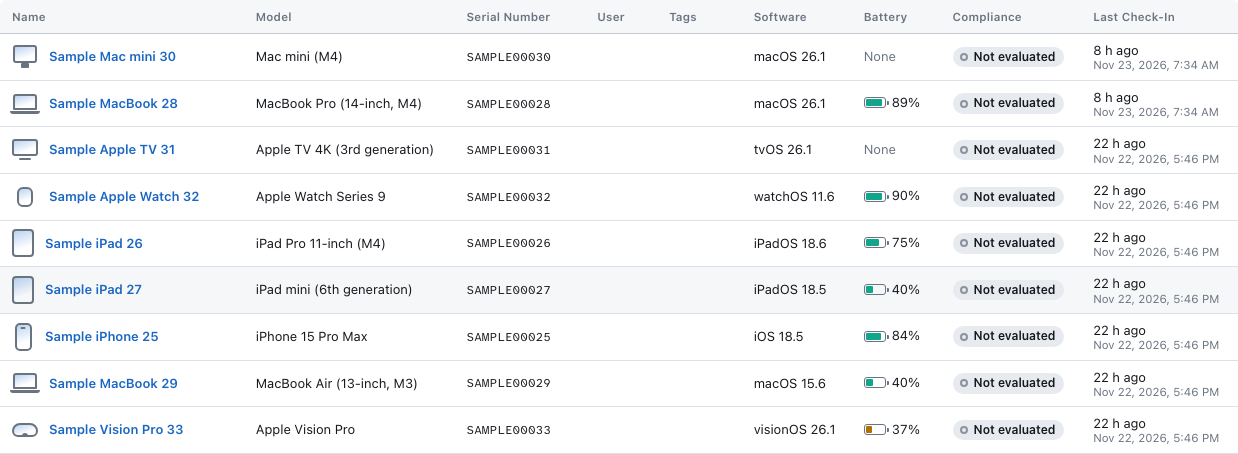
- Inventory. Review device details, software versions, installed profiles and app inventory where the device reports them.
- Compliance. Check requirements such as a minimum software version, passcode or encryption. Find the devices that fall short before you send a change to the whole fleet.
- Remote actions. Lock, restart, update or erase eligible devices. Lost Mode requires a supported supervised device. Return to Service can prepare an eligible device to enroll again after an erase.
- Activity. Review queued commands and their results, including commands waiting for a phone or Mac to come back online.
Pip MDM supports iPhone, iPad, Mac, Apple TV and Apple Vision Pro, plus eligible Apple Watch devices through a paired supervised iPhone. Available actions depend on software version, supervision and enrollment type.
Keep the console and records on your own server
The Mac app runs the service in the background and opens the private console. Give a colleague read-only access if they just need to look up a device. Keep commands such as erase for the administrators who need them. With an encrypted backup, you can restore your settings and device identities if the Mac fails.